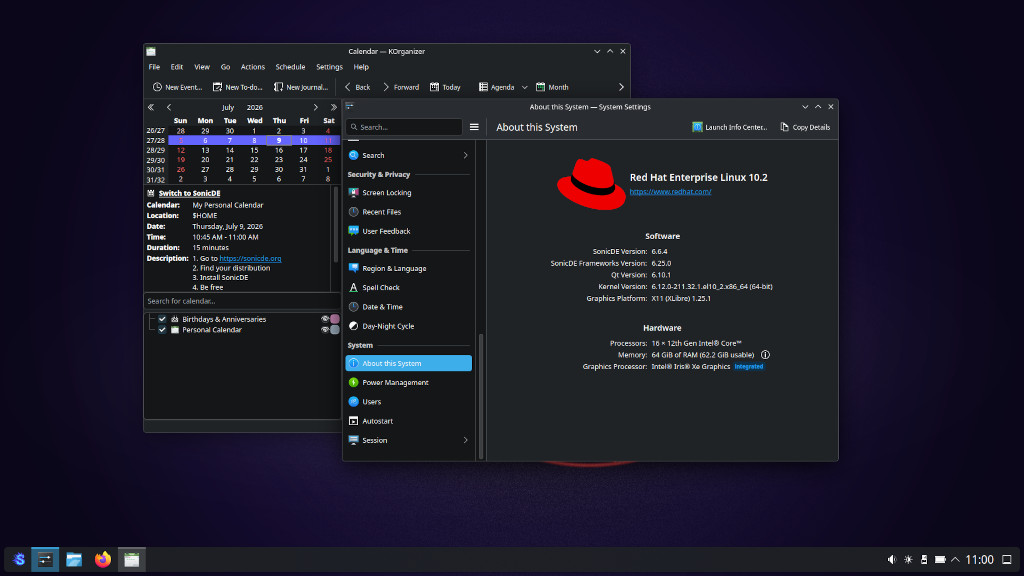
# SonicDE for Enterprise Linux 10 and Fedora
This third-party repository provides [SonicDE](https://sonicde.org) source and binary packages for [Enterprise Linux](https://www.redhat.com/en/technologies/linux-platforms/enterprise-linux)-based distributions and for [Fedora](https://fedoraproject.org/). SonicDE, or the Sonic Desktop Environment, aims to preserve and improve the X11-specific aspects of KDE. You can learn more about SonicDE at [sonicde.org](https://sonicde.org/).
The packages of this repository are known to work with [AlmaLinux](https://almalinux.org/), [Red Hat Enterprise Linux (RHEL)](https://www.redhat.com/en/technologies/linux-platforms/enterprise-linux) and Fedora. They also should on [Oracle Linux](https://www.oracle.com/linux) and [Rocky Linux](https://rockylinux.org).
Since SonicDE completed its hard fork of KDE Frameworks and Plasma, this repository packages the complete SonicDE stack itself: the frameworks (currently 6.29.0.x), the workspace (currently 6.7.4.x) and the applications (26.04.x). The very same versions are built for EL10 and for Fedora, so neither distribution's KDE packages decide which SonicDE version you get. The SonicDE packages carry `Provides`/`Conflicts` for the corresponding `kf6-*` and `plasma-*` packages, so they replace their EPEL/Fedora counterparts instead of coexisting with them.
## Installing SonicDE Manually
### Choosing an X11 Display Server
EL10 has no X11 server by default or in the official repos, and Fedora no longer ships one either, so you need to install one. We recommend using the XLibre X11 server. Follow the installation instructions on the [XLibre for Fedora and EL GitHub page](https://github.com/xlibre-fedora-el/rpmspecs).
### Enabling the SonicDE Copr Repository
> [!warning]
> Beware that SonicDE has removed the Wayland parts, so the Wayland session may not work after installing it even though it is listed as an option in the display manager. You may not be able to start KDE Wayland anymore. Proceed at your own risk.
> [!note]
> On EL10 the EPEL repository is still needed for build and runtime dependencies that SonicDE does not fork, such as `plasma-systemsettings`. Enable it as described in [Getting started with EPEL](https://docs.fedoraproject.org/en-US/epel/getting-started/). Installing the whole "KDE Plasma Workspaces" group first is no longer necessary.
Add the SonicDE repository to your system:
```shell
# Enterprise Linux 10
sudo dnf config-manager --add-repo https://copr.fedorainfracloud.org/coprs/g/SonicDE/SonicDE-EL10/repo/rhel+epel-10/group_SonicDE-SonicDE-EL10-rhel+epel-10.repo
# Fedora
sudo dnf copr enable @SonicDE/SonicDE-EL10
```
### Installing SonicDE
When XLibre has been installed, you can install the SonicDE packages and other needed X11 packages by running this command:
```shell
sudo dnf install --allowerasing xorg-x11-xinit xkbcomp xinput xrandr \
sonic-workspace sonic-workspace-libs sonic-workspace-common \
sonic-workspace-x11 sonic-win sonic-desktop-interface \
sonic-interface-libraries sonic-keybind-daemon \
sonic-frameworks-windowsystem sonic-system-info sonic-screen \
sonic-screen-library sonic-sysguard-library
```
As the [GNOME Display Manager (GDM)](https://en.wikipedia.org/wiki/GNOME_Display_Manager) has no X11 support compiled in, you need to switch to an X11-capable display manager. SonicDE ships its own, `sonic-login-manager`:
```shell
sudo dnf install sonic-login-manager
sudo systemctl enable --force plasmalogin.service
```
Alternatively you can keep [SDDM](https://en.wikipedia.org/wiki/Simple_Desktop_Display_Manager), optionally with the Sonic Silver theme from `silver-sddm`:
```shell
sudo dnf install sddm silver-sddm
sudo systemctl enable --force sddm.service
```
### Rebooting Your System
Now reboot your system. At the login screen choose "Plasma (X11)" as the session type. Log in with your credentials, start the program System Settings and verify that you’re running SonicDE on the “About this System” page. You do? Congratulations!
If your system only shows a blinking cursor after the reboot, switch to a [text console](https://wiki.archlinux.org/title/Linux_console) via, e.g., Ctrl+Alt+F3, log in as your regular user and enter the following commands:
```shell
sudo dnf reinstall sddm
sudo systemctl restart sddm
```
## Building the Packages
Every package lives in its own directory named after the package and contains a single spec file. Sources are the release tags of the [SonicDE repositories](https://github.com/Sonic-DE/) — never `download.kde.org` and never the `v`-prefixed tags inherited from KDE.
`build-order.txt` lists the packages in dependency tiers computed from the `BuildRequires` of every spec by `ci/generate-build-order.py`. Packages within a tier are independent; each tier needs the previous ones.
```shell
# Parse every spec and check it against build-order.txt
ci/parse-specs.sh
# Build one tier in mock, for EL10 and for Fedora
ci/build-tier.sh tier1 alma+epel-10-x86_64
ci/build-tier.sh tier1 fedora-43-x86_64
# Submit builds to Copr, tier by tier
./copr-build.sh all
```
`sonic-rpm-macros` provides the `%_kf6_*` paths and the `%cmake_kf6` macro family. It replaces `kf6-rpm-macros`, so it must be built and installed first — it is in the first tier for that reason. Directory ownership still comes from the distribution's `kf6-filesystem`, which contains no KDE code.
## Getting in Contact
Please report any enhancement requests or issues with this repository at [Issues · sonicde-fedora-el/rpmspecs](https://github.com/sonicde-fedora-el/rpmspecs/issues). In case you need help, want to report success or talk about other aspects, please also check the official SonicDE channels.
 [Bluesky](https://bsky.app/profile/sonicdesktop.bsky.social)
  [Discord](https://discord.gg/cNZMQ62u5S)
  [Mastodon](https://mastodon.social/@sonicdesktop)
  [Matrix](https://matrix.to/#/#sonicdesktop:matrix.org)
  [OFTC IRC](https://webchat.oftc.net/?channels=sonicde%2Csonicde-devel%2Csonicde-dist&uio=MT11bmRlZmluZWQb1)
  [Telegram](https://t.me/sonic_de)
  [X (Twitter)](https://x.com/SonicDesktop)